Automating Document Collection Follow-Up Without Adding Staff
Trigger-based workflows route routine follow-up tasks away from staff.

To automate document collection follow-up without adding staff, a firm needs more than reminder emails sent on a schedule. It needs a trigger-based workflow that handles requests, receipt processing, status changes, and escalation together. The purpose is to keep scarce professional capacity on billable work, while routing the cases that genuinely need judgment to a person.
Why document follow-up consumes capacity that firms cannot afford to spend
Wolters Kluwer's annual survey of US accounting firms ranked “late and unprepared clients” as respondents’ number-one challenge. The bottleneck begins before preparation can proceed, yet resolving it consumes the same staff capacity needed to complete the work. For each document still missing, staff have to check, contact the client, and track what happens. That work still needs to be done when staff are hard to hire.
The AICPA 2024 PCPS CPA Firm Top Issues Survey found that finding qualified staff was the top challenge for most groups of firms by size. More headcount is therefore not a dependable answer to recurring administrative work. Even where hiring is possible, assigning qualified people to chase documents spends scarce capacity on work that does not require their expertise.
Why the follow-up problem has three separate layers that each require a different automated response
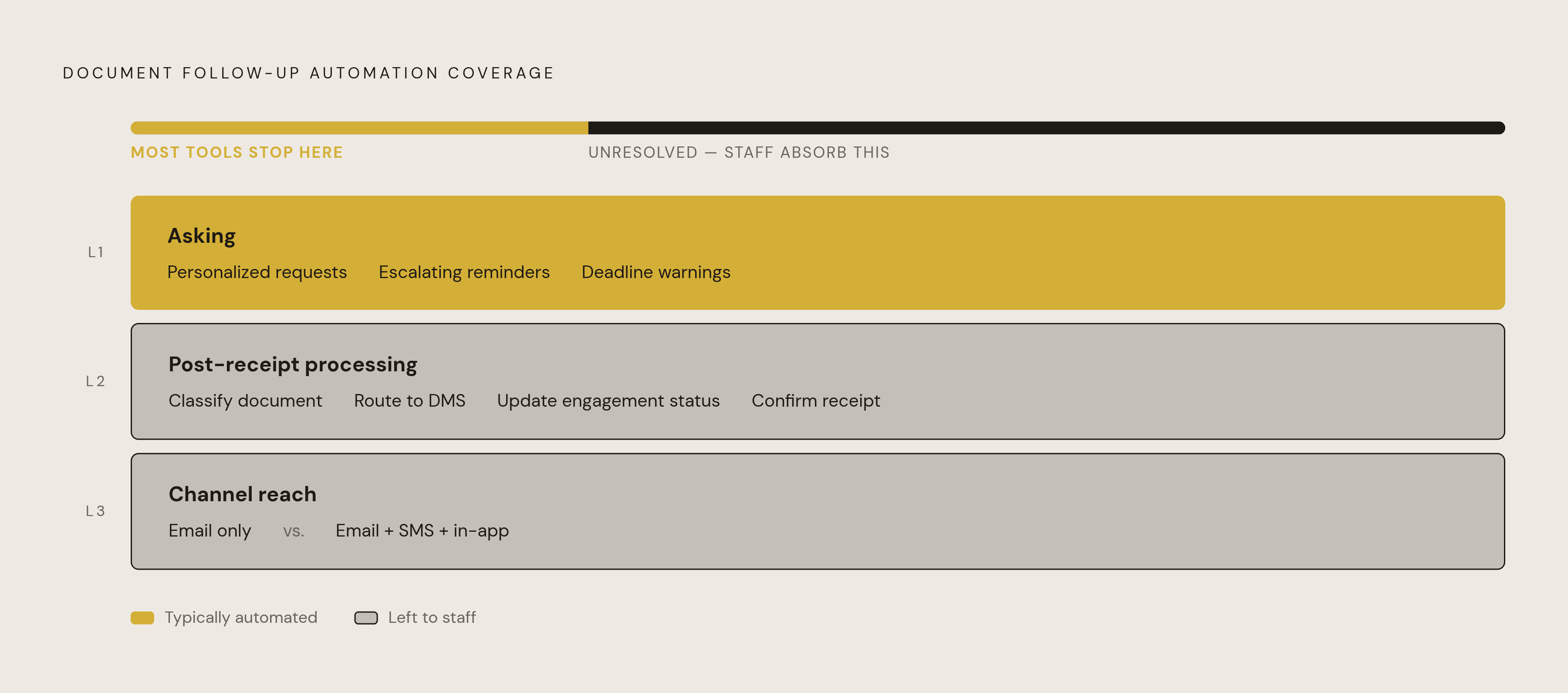
The first layer is asking. It includes personalized requests, escalating reminders, and deadline warnings, which are the activities most collection tools automate. Automating this layer alone can save staff hours while keeping the core preparation process the same. But sending the request is only the beginning.
The second layer is post-receipt processing. Once a document arrives, someone must classify it, route it to the document management system, update the engagement status, and confirm receipt. Those small tasks add up across hundreds of engagements. A generic email-reminder tool leaves this handoff to staff, so the arrival of a file starts another round of manual work.
The third layer is channel reach. Email-only follow-up depends on clients opening and acting on email, while SMS and in-app notifications address clients through other channels. A firm can automate asking successfully and still leave both receipt processing and client reach unresolved.
What must be standardized before any automation can replace manual follow-up
MyFirm360's process map states the governing principle as standardize first, then automate. Each stage needs a defined input, output, and completion criterion so that the system has something reliable to trigger on. Otherwise, automation accelerates an inconsistent process. Standardization starts with a document checklist template for each engagement type, including individual returns, business returns, bookkeeping, and audit preparation. These templates define what is required without over-requesting documents or leaving gaps.
The next step is to define four request states. Requested means the checklist has been sent but nothing has been uploaded. Partially complete means some documents have arrived while others are still missing. Complete pending review means all documents have been uploaded but staff confirmation is still required. Verified complete means the file has been confirmed ready for preparation to begin.
An upload is not necessarily a usable preparation file. Liscio's workflow guide describes collection starting from service types and calendar milestones, so the firm must also identify the opening event, such as an engagement letter being signed, a service deadline approaching, or busy season starting. Before configuration, the firm should assign each client segment its channels, whether email only, email plus SMS, or in-app notification.
How a trigger-based escalation cadence replaces manual tracking across the full follow-up cycle
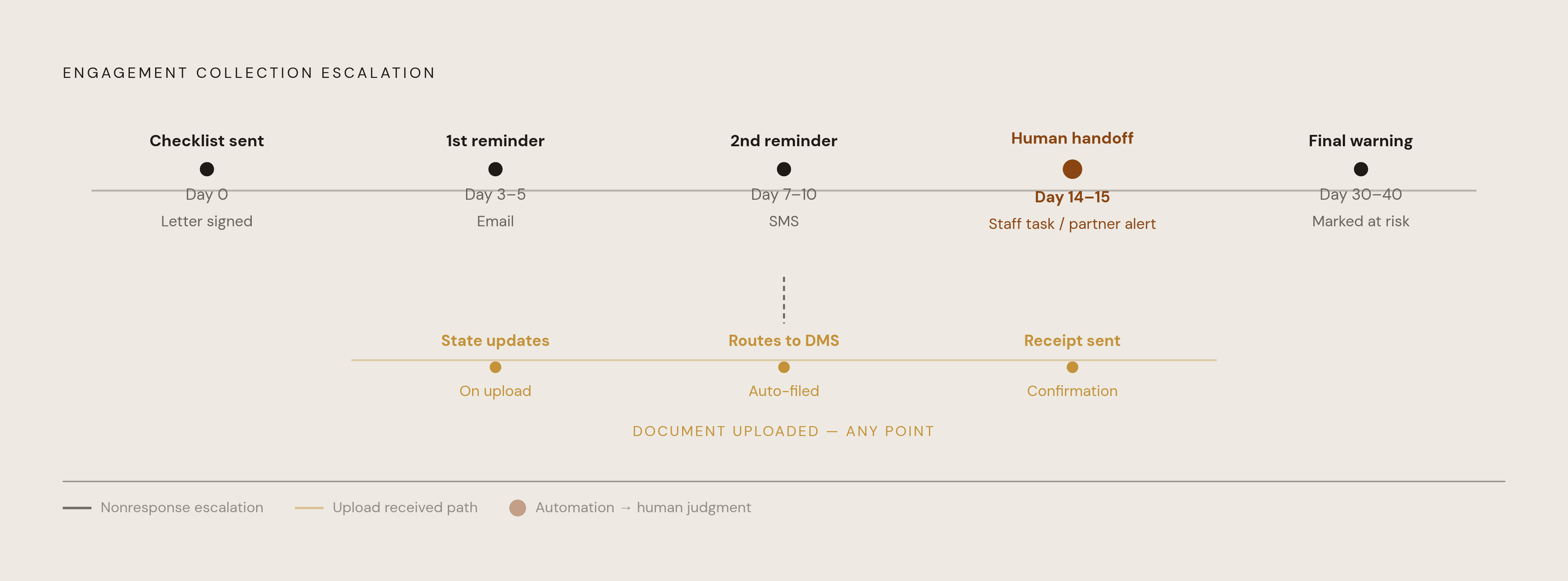
With those definitions in place, the opening event can launch the sequence automatically. When an engagement letter is signed, the system sends the client a personalized document checklist. Staff no longer need to draft or initiate that request. Elapsed time and the request state automatically determine the next action.
An illustrative cadence sends a reminder on day 3–5 if nothing has been uploaded. On day 7–10, a second reminder can use a different channel, such as SMS. By day 14–15, continued nonresponse becomes a staff-assigned task or partner alert. Human attention replaces another unanswered automated nudge. For longer collection cycles, a final deadline warning on day 30–40 can precede marking the engagement at risk.
When a document is uploaded, the workflow updates the request state, routes the file to the correct DMS folder, and sends a receipt confirmation. The defined review states still govern whether preparation can begin. A real-time dashboard then shows staff which engagements are requested, partial, awaiting review, or verified complete, replacing the tracking spreadsheet and routine receipt-status exchanges.
For a practice handling many engagements, the time calculation runs across every repeated action, including every reminder sent. Each upload that no longer requires manual routing or acknowledgment removes another task from the collection cycle. The firm still needs to choose the escalation threshold with care. At that point, the system should stop reminding and alert staff, because persistence without a handoff can turn a tolerable workflow into one clients complain about.
Why adding SMS to email reminders meaningfully increases collection completion rates
Email familiarity does not guarantee email attention. Clients may have attached documents to messages for decades while still overlooking a request in a crowded inbox. SMS reaches them through a channel with materially higher open rates and less competition for tax-firm communications. Used with email, it can meaningfully improve collection completion by addressing the reach gap while keeping reminder volume unchanged.
The configuration effort is typically measured in hours. That makes adding SMS a relatively small workflow change with a favorable potential return. The objection that clients do not want texts from their accountant deserves a distinction, however. An unsolicited promotion is different from a time-sensitive reminder tied to a filing deadline the client cares about. Opt-in framing during portal setup resolves that concern for most clients.
Native practice management tools usually send only email reminders from within their own systems. Adding SMS usually takes a purpose-built collection tool or an orchestration layer above the system already in place. The firm should plan for that need from the start, before too few clients respond and it has to change the design.
The client portal adoption problem and how to design around it before it breaks the workflow
A reminder can reach the client and still fail at the next step. Getting clients to use the portal is the biggest risk when putting the workflow in place because they may expect to create accounts, forget passwords, and learn another process without seeing how it helps them. That resistance has a rational basis. If the client responds by emailing a PDF instead, a well-configured intake sequence still loses the submission from its intended path.
The design response starts with client convenience. Onboarding should explain that the portal allows uploads at any time and from any device, without finding a fax machine or remembering email attachments. Mobile-first upload makes that benefit concrete. Clients who avoid desktop logins can photograph documents on a phone and submit them directly, making this capability a useful tool-selection criterion.
Even good onboarding will not produce complete first-season adoption. The workflow should therefore give staff clear steps for putting documents sent by email and requests made by phone into the same tracking system. Designing for their behavior preserves visibility without pretending that changing software will remove every source of client resistance.
How to evaluate whether an all-in-one practice management platform or a separate orchestration layer fits the firm's follow-up needs
An all-in-one platform reduces integration complexity by keeping client-facing collection and back-office work in one environment. It typically combines document collection with e-signature, organizers, and the tax calendar. That simplicity has practical value. It is a strong fit for a small-to-mid-sized client base whose clients respond sufficiently well to email that additional channels are not urgent, with limitations when the firm needs SMS or triggers that span several systems.
A purpose-built document collection tool serves a different need. These tools typically offer checklist libraries by return type, mobile-first upload, and tighter DMS integration. They can suit tax practices that handle many returns and want to generate checklists without setting them up by hand. They also fit firms that want client-facing collection while retaining their existing DMS. Cross-system trigger workflows may still require a separate orchestration layer.
An orchestration layer adds SMS, event triggers across systems, and workflow branching above the current practice management platform. It preserves the core system but requires more upfront configuration. The trade-off is greater channel and logic flexibility. This approach fits firms that already use trigger-based workflows elsewhere and want to connect document follow-up to the rest of the client lifecycle. Firm size and volume influence the decision, but so does the team's ability to configure and maintain those connections.
Liscio's documentation emphasizes integration with existing practice management systems so that document workflows align with established processes. The process map from MyFirm360 instead emphasizes connecting standardized stages from intake through billing in a purpose-built practice management platform. The choice is not a feature-count contest. A platform designed for accountants’ intake and compliance workflows can remove burdens imposed by generic tools, while a separate layer can supply flexibility an embedded sequence lacks. The chosen architecture must meet the firm's defined workflow with an acceptable configuration burden.
Where the automation argument breaks down — and what it cannot yet replace
Current tools handle asking well and post-receipt routing increasingly well, but they largely leave finding documents to the client. Someone must still find the W-2s, brokerage statements, and business records. More consistent requests do not perform that search. Standard collection automation cannot reach into the client's downloads folder or email account and assemble the missing packet on the client's behalf.
Client-side finding agents represent an emerging response to that gap. They would search the client's own sources, assemble documents for approval, and deliver the packet to the firm's DMS, but they are not standard in most firm workflows. Ariege Misherghi, SVP and general manager of AP, AR and the accountant channel at Bill, has identified pre-processing as the area projected to see the greatest reduction in human involvement. That includes sourcing documents, extracting data, and categorizing information correctly. A projected capability is not a present operating assumption.
Some engagements need a phone call, a relationship conversation, or a partner touchpoint. The workflow should bring those cases to a person at the defined threshold. This does not invalidate the investment. Recovering time on the standard path leaves staff available for the exceptions where judgment and personal attention can change the outcome.
What practitioners do with the hours that automated follow-up returns
Reminder volume is not the measure of success. The useful measure is what practitioners can do with the hours no longer spent checking outstanding requests, acknowledging uploads, and maintaining status records. That capacity should go to complex tax planning, proactive client conversations, multi-entity structuring, and other billable advisory work.
Firms that use automated follow-up report shorter close cycles mainly because documents take less time to arrive, while preparation and review take the same amount of time. The gain comes from reducing the wait. Preparers spend less time blocked by missing documents and more time doing the work they were trained to perform. The operational responsibility is then to direct recovered capacity toward higher-value services rather than absorb it into more administrative overhead. Automating collection is ultimately a decision about the proper use of professional judgment.